
Digital Business Card for Consultants: How to Build Trust Before the First Meeting
What consultants should put on a digital business card, why the Professional layout suits them, how to use the card with clients, managing several practices and checking what works.

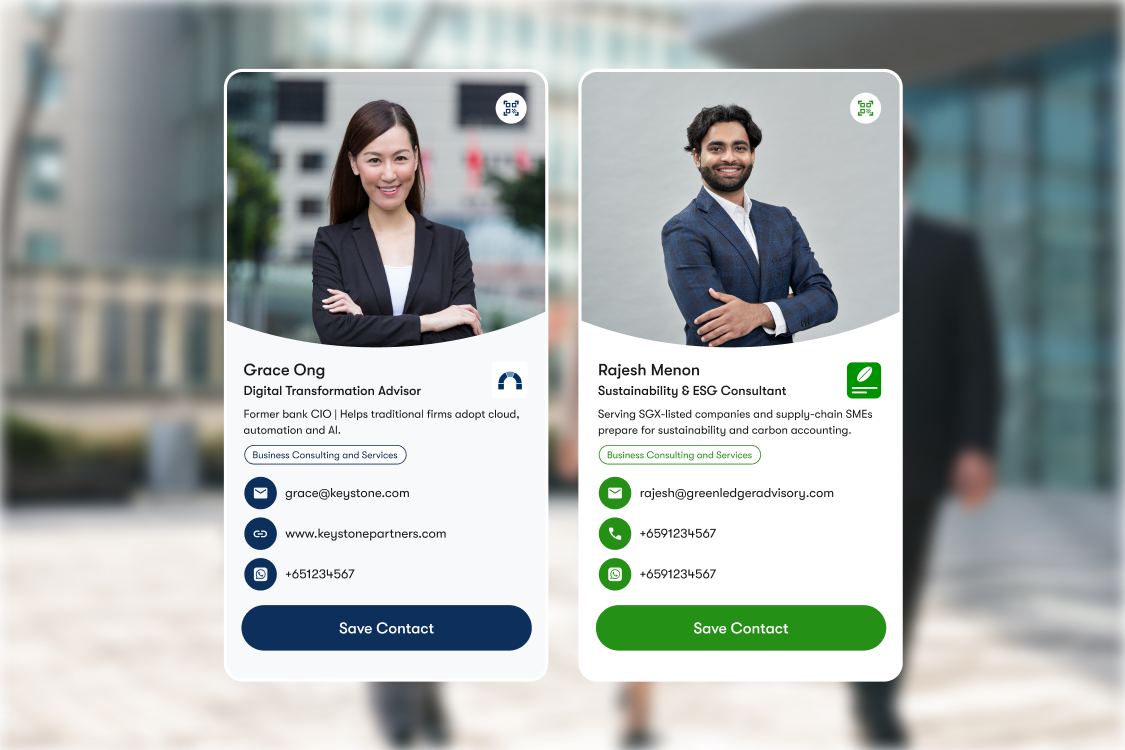
Consulting is a trust-based business. Before a prospect commits to a discovery call, they may look up your background, review your expertise and decide whether your experience fits their needs.
A traditional business card gives them your contact details. A digital business card for consultants can do more: introduce your specialisation, showcase your work, link to your professional profiles and make it easy to book a conversation, all from one shareable page.
The goal isn't to fit your entire resume onto a screen. It's to give the right prospect enough context to understand what you do, see why you're relevant and know what to do next.
TL;DR: Build your digital business card around five things: a professional photo, a clear statement of who you help, the contact channels you actively use, credible evidence of your expertise and a direct next step such as booking a discovery call. Keep the page focused on what a prospective client needs to know before speaking with you.
Why do consultants need a digital business card?
Consultants need a digital business card because clients buy the person before the service, and a new contact needs enough information to trust you before they agree to a meeting.
Prospects check you out before they decide to work with you. If you work independently, there is often no office, brand or sales team behind you for them to find. A digital business card sends them to the version of you that you control, with your photo, what you do, who you have done it for and how to book time with you.
It also keeps up with you. Consultants change focus, add services and move between firms more often than most professionals. A digital business card updates the moment you edit it, so the card you handed out last year still shows your current details.
What should a consultant put on a digital business card?
A consultant's digital business card should cover who you are, who you help, how to reach you, how to book you and why they should trust you. Six elements do most of the work.
1. Clear, recent profile photo
A recent, well-lit headshot helps a contact connect your card to the conversation they had with you.
The Professional layout leads with your photo, so use one you would be happy for a client to see first.
2. One line on who you help
Your title says what you are. A short description says what you do for clients, such as "Helping F&B owners in Singapore cut food costs".
Keep it to one sentence. A contact skimming your card on their phone should know within a few seconds whether you are relevant to them.
3. Key contact details
List the channels you check every day, usually phone, email and WhatsApp. Give prospects a clear next step by prioritising the contact methods you actually use. You can customise your card's action buttons to make relevant options, such as WhatsApp or Save Contact, easier to find.
If you would rather not show your mobile number, a contact form lets people reach you without it.
4. Booking link
A booking widget lets a new contact book a discovery call straight from your card. You can embed Calendly, Google Calendar or Microsoft Bookings, and the widget shows your live availability.
Put it near the top. It turns "let's catch up sometime" into a time in both calendars.
5. Proof of your work
Add a few links that show your expertise, such as a case study, a published article, a talk, your LinkedIn profile or a testimonial page.
Choose two or three strong pieces. Only show client names or logos you have permission to use.
You can also embed a single LinkedIn post on your card, such as an article you wrote or a project announcement, so visitors read it without leaving the page.
6. Contact form
A contact form lets people who are not ready to call leave their details instead. Submissions land in your leads list, so you can follow up when the timing suits them.
Which layout works best for consultants?

The Professional layout works best for most consultants because it leads with your photo and puts your contact details and Save Contact button on the first screen.
One Good Card offers four layouts: Classic, Creator, Business and Professional. Professional is designed for consultants and professionals who want to build trust and share their expertise. Your photo fills the top of the screen, followed by your name, title, a short description and your contact rows, with action buttons such as Save Contact and WhatsApp at the bottom.
Two other layouts can also fit:
- Classic suits consultants who want a simple, familiar layout with less emphasis on the photo.
- Business suits consultants inside a firm, where the firm's brand should lead and every consultant's card should look the same. A firm that wants it on every consultant's card can move the whole firm to digital business cards for teams.
For a side-by-side look at all four, see which digital name card layout is right for you. You can switch layouts at any time without losing your content, as the help guide on profile layouts shows.
How do consultants use a digital business card with clients?
Consultants use a digital business card at every point where a prospect might want their details: before first meetings, at events, after calls, in proposals and on messaging apps.
- Before a first meeting: Add your card link to the confirmation email or calendar invite, so the prospect can see who they are meeting and what you do.
- At networking events: Tap your NFC card on the other person's phone and your card opens, ready to save with one tap. No app is needed on their side.
- On your laptop or desk: A Mini NFC sticker sticks to your laptop, notebook or meeting room table, so clients can tap it at the end of a workshop.
- After a discovery call: Add your card link to your follow-up email and email signature, so the prospect can find your details again when they are ready.
- In proposals and slides: Put your card's QR code on the last page of a proposal or the closing slide of a talk.
- On WhatsApp: Share your card link in chats, which suits markets where business happens on WhatsApp. See how to use a digital business card on WhatsApp.
- From your phone wallet: Add your card to Apple or Google Wallet so you can show the QR code even when you do not have the physical card with you.
Can consultants with more than one practice use one card?
Yes. One Good Card Pro supports up to three profiles, so you can tailor your shared details to the conversation. Switch which one your physical card shares, so one card can cover a consulting practice, a coaching service and an advisory role.
Each profile has its own details, links and layout. A client of your consultancy sees your consultancy details, and a coaching client sees your coaching page. For more on running several roles at once, read our branding and networking tips for people with multiple jobs.
How do you know if your digital business card is working?
Check how many people view your card, which links they click and how many save your contact, then adjust the order of what is on it.
Use profile analytics to see views, contact saves and interactions with your links and widgets. If prospects visit your card but rarely click your booking link, try making the call to action clearer or moving it higher on the page. If people view your card but rarely open your booking widget, move it higher or make the label clearer. If one case study gets most of the clicks, lead with it. Our guide to how digital name cards use analytics covers what each number means.
The people who leave details through your contact form land in the contact manager, where you can track them from first conversation to signed engagement.
How do you get started?
Start with the information a prospective client needs most: who you help, what you specialise in, why they should trust your expertise and how they can reach you.
Choose a layout that fits your professional identity, add a recent photo and a few credible examples of your work, and make booking a discovery call straightforward. Once you start sharing your card, review its analytics to understand which links attract attention and where prospects might need a clearer next step.
With One Good Card, you can share your digital name card through a physical NFC business card, QR code or profile link.
Ready to make your next introduction count? Explore One Good Card's digital business card options and build a profile that helps prospective clients understand your value before the first meeting.

Frequently asked questions
What is a digital business card for consultants?
Which One Good Card layout is best for consultants?
Can clients book a meeting from my digital business card?
Do the people I meet need an app?
Can I update my details after I have shared my card?
The all-in-one digital business card
for professionals
- ✓ Fully Customisable
- ✓ Lifetime Updates
- ✓ AES-256 Encryption
- ✓ Certified CSA-Compliant
- ✓ iOS and Android