
Which Digital Name Card Profile Layout Is Right for You?
Classic, Creator, Business, or Professional — explore One Good Card's four profile layouts and find the one that fits your role and networking style.

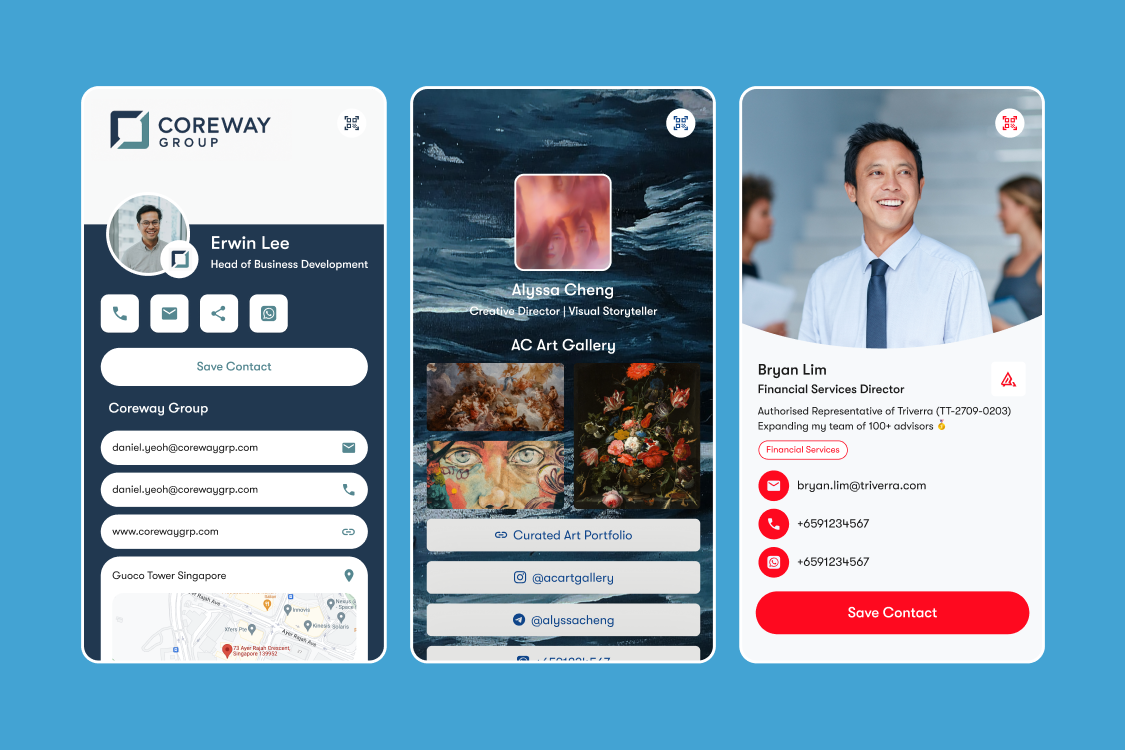
One Good Card now offers four distinct profile layouts — Classic, Creator, Business, and Professional. Each is designed for a different type of professional and a different networking context. Here's a breakdown of each one and how to decide which fits you best.
Why Your Digital Name Card Layout Matters
Your digital business card is often the first real touchpoint someone has with your professional identity after meeting you. It's where they go to save your details, explore your work, and decide whether to follow up. The layout determines what they see first, what gets prioritised, and what impression you leave.
A salesperson and a graphic designer have very different things to communicate, and a one-size-fits-all layout serves neither of them particularly well. That's exactly why having layout options matters.
1. Classic: Clean, Simple, and Works for Everyone

If you've been using One Good Card for a while, Classic is the layout you already know. It's the layout that has carried One Good Card from the beginning, and for good reason.
Clean, structured, and universally professional, it puts your essential information front and centre: name, designation, company, contact details, social links — everything a new connection needs, presented clearly and without distraction.
It looks equally sharp for a consultant, a lawyer, an accountant, an HR professional, or anyone who wants to switch to digital name cards without visual complexity getting in the way.
Classic is the right choice if:
- You want something clean and universally professional
- You want a layout that looks great without requiring much customisation effort
- You're setting up digital business cards for a mixed team with different roles and industries
Best for: Professionals across all industries who want a straightforward, polished digital business card without unnecessary complexity.
2. Creator: Built for Visuals, Perfect as a Link in Bio

The Creator layout is designed around visual content. It gives you dedicated space to showcase images, videos, and a gallery of your work, turning your digital card into a portfolio as much as a contact page. When someone taps your card, they're not just reading about what you do; they're seeing it.
This layout is also ideal as a link in bio for Instagram, TikTok, or YouTube. The Creator profile gives you a fully branded, fully customisable landing page with your contact details, social links, and content all in one place.
Creator is the right choice if:
- You're a photographer, videographer, designer, or visual artist
- You're a content creator who needs a link in bio that does more than list links
- You are managing a brand profile, that compiles all things related to your brand and company
- You want to share a portfolio alongside your contact details without managing a separate website
Best for: Brands, creatives, content creators, photographers, designers, videographers, artists, and anyone whose work is best shown rather than described.
3. Business: Corporate-Ready, Built for Teams

The Business layout is designed with teams in mind. It's a clean, structured layout that can be fully customised to match your corporate branding, colours, logo, and banners, so every card across your organisation looks like it belongs to the same company.
For businesses using One Good Card's Centralised Team Dashboard, the Business layout makes it easy for administrators to standardise the look and feel across the entire team.
Business is the right choice if:
- You're deploying digital cards across a team or company
- Brand consistency across all employee cards is a priority
- You need a layout that looks polished in corporate and client-facing contexts
- You want a clean, professional look that doesn't lean too personal or creative
Best for: Companies, corporate teams, and organisations that need a consistent, on-brand digital card across all employees.
4. Professional: Image-First, Contact-Forward

The Professional layout is designed around one core goal: making it as easy as possible for someone to save your details and reach you. It leads with your photo and key contact information in a layout that's immediately clear and saveable, so the people you meet can identify who you are and get in touch without having to scan through your profile.
For professionals who meet a high volume of new contacts, this removes the friction that often gets in the way of a follow-up. Your name, your face, your number, your email, right there, easy to save with one tap. The Professional layout makes this as straightforward as possible.
Professional is the right choice if:
- You're in sales, BD, account management, or any client-facing role
- Getting your contact details saved quickly and accurately is the primary goal
- Your networking is primarily about sharing contact details
- You want a layout that removes every possible barrier between meeting someone and them having your details
Best for: Professionals across all industries who want a straightforward, polished digital business card without unnecessary complexity.
How to Choose the Right Layout for You
Not sure where you land? Here's a simple way to think about it:
If you want the tried-and-tested layout that's served professionals since day one, Classic
If your work is visual and you want to show it, Creator.
If you're setting up cards for a team with consistent branding, Business.
If you're in a client-facing role and want your contact details saved quickly and easily, Professional.
And remember, you're not locked in. One Good Card allows you to switch layouts at any time from your dashboard without losing any of your profile content. If you try one and it doesn't feel right, changing it takes seconds.
Switching and Customising Your Layout
To change your profile layout, log into your One Good Card dashboard, go to your profile settings, and select the layout that suits you. From there you can customise colours, content blocks, and branding to match your personal or corporate identity.
If you're a team administrator managing multiple profiles through the Centralised Team Dashboard, you can set and standardise layouts across your organisation from a single admin view.
For a full step-by-step walkthrough of how to customise your layout, visit our Help Centre.
The right profile layout is the one that puts the most relevant version of your professional identity in front of the people you're trying to reach. Whether that's a clean contact card, a visual portfolio, a branded team profile, or a contact-forward card built for client-facing roles, there's a layout built for it.

Related articles
Build Your Personal Brand the Right Way With This Tool
This dynamic and interactive digital name card helps you showcase your work, share links, connect effortlessly and make a lasting...
Scan Paper Name Cards into Contacts with OCR Scanner
One Good Card's OCR Scanner reads paper business cards and saves contacts automatically. Available on iOS and Android. No more...
How One Good Card's Contact Form and Leads Page Work
The contact form is a widget you can add directly onto your One Good Card digital name card
The all-in-one digital business card
for professionals
- ✓ Fully Customisable
- ✓ Lifetime Updates
- ✓ AES-256 Encryption
- ✓ Certified CSA-Compliant
- ✓ iOS and Android