
How to Maximise Your One Good Card: 10 Features You Might Not Know
Discover 10 powerful One Good Card features you might not know, from real-time edits and lead capture to CRM sales pipeline, analytics, offline mode, and team tools

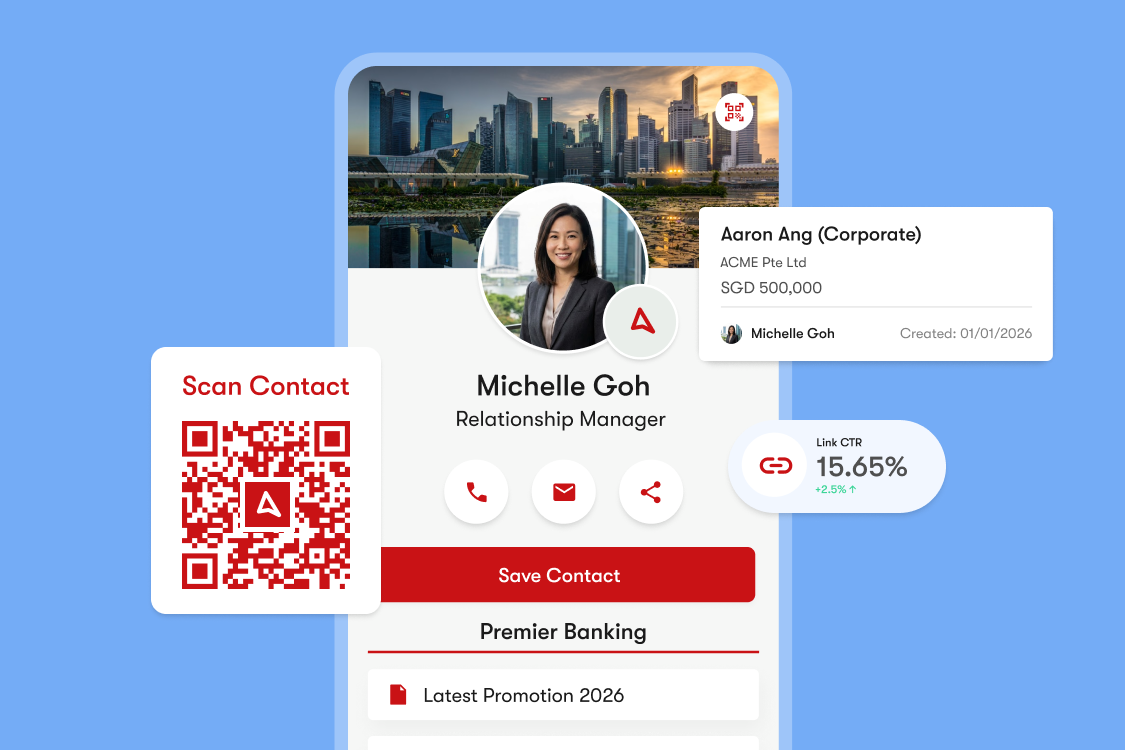
You've probably started using One Good Card to share your contact details, and that's a great place to begin.
But as you use it more, you will realise that One Good Card can do much more than just a replacement for your paper name cards. It is designed to help you stay organised, follow up easily, and overall make networking feel less stressful.
This guide shows you 10 useful features and ideas you can use to get more value from your One Good Card, in ways that make sense for how you network.
1. Edit instantly, in real time

One of the simplest, but most powerful benefits of One Good Card is that your profile updates instantly. Got a promotion, or relocated to another office? Those updates apply immediately and can be viewed by anyone who saved your One Good Card, even from months ago.
This means:
- No outdated information going around
- No reprinting or redistributing cards
- No need to "re-introduce" yourself
Your One Good Card stays current, as you and your career evolve.
2. Create more than one profile

If you are someone who is constantly on multiple "side-quests", this feature is bound to be useful for you.
You might attend events as a:
- Full-time employee
- Freelance creative with a portfolio
- Business owner for your side hustle
With multiple profiles, you can create different versions of your One Good Card for different situations. Each profile can have its own design, description, contact information, and links. This makes your introductions clearer and more relevant.
3. Collect leads directly through your card

Networking can happen anywhere. The person you met might not always have their business cards with them, and exchanging contacts does not always lead to a follow-up.
With the contact form widget, you can collect leads directly through your One Good Card using the built-in contact form.
Instead of hoping someone messages you later, they can:
- Leave their name and contact details
- Add a message or reason for reaching out
- Express interest or request on the spot
This is especially useful at events or exhibitions where conversations are brief, but interest is high.
A notification will be sent directly to your email and One Good Card dashboard so that you can stay on top of your follow-ups.
4. Organise your contacts into groups

As your network grows, it becomes harder to keep track of everyone.
Create groups to organise contacts, whether that's:
- Clients
- New prospects
- Event connections
- Partnership opportunities
- Personal contacts
Grouping contacts gives you context and makes it easier to decide who to follow up with and when, without relying on memory alone.
5. Manage your pipeline on the go

Most connections are made during events, coffee meetings, site visits, or even a quick phone conversation between appointments. One Good Card CRM is designed to be mobile-first, so that you can manage your pipeline wherever you are, without needing a laptop.
From your phone, you will be able to:
- Add new deals immediately after meeting someone new
- Drag-and-drop to move deals through different stages of your pipeline
- Add and update notes while conversations are fresh in your mind
- Keep track of who needs a follow-up
One Good Card works seamlessly on mobile browsers and devices, there is no heavy setup or learning curve, making it easy to use and update your pipeline even in busy environments.
For professionals who are frequently on the move, this mobile-friendly approach turns your phone into a portable CRM, helping you stay organised without interrupting your day with admin work.
6. Customise multiple pipelines for different scenarios

Not every conversation follows the same path. Some connections turn into sales opportunities, others are partnership opportunities, job leads or long-term relationships.
Instead of trying to track everything in a single pipeline, create and customise multiple pipelines so that each type of relationship can follow a flow that actually makes sense.
Here are some common pipeline setups users find helpful:
-
Sales Pipeline: Ideal for business owners, sales professionals and consultants.
Stages: New Contact → Discovery Call → Proposal Sent → Negotiation → Won/Closed -
Event Pipeline: Perfect for conferences, roadshows and trade fairs.
Stages: Event Lead → Qualified Interest → Follow-Up Sent → Meeting Booked → Converted -
Partnership Pipeline: Useful for founders, marketers and business development teams.
Stages: Introduction → Alignment Discussion → Collaboration Idea → Agreement → Active Partnership -
Recruitment Pipeline: Helpful for HR teams, recruiters or founders hiring for their team.
Stages: New Candidate → Initial Conversation → Interview → Offer Stage → Hired / Archived
Whether you're networking for sales, hiring, partnerships or events, having the right pipeline structure helps you stay organised without overcomplicating your workflow.
7. Analyse what's getting attention

One Good Card gives you insights into how people interact with your profile and content. These insights help you understand what's working and what might need adjusting.
Collecting and analysing your networking performance used to be a near impossible task. With One Good Card analytics, you can easily gather insights and optimise your networking strategy.
8. Share in more ways than you think

One Good Card is designed to be shared wherever conversations happen. Beyond NFC tap and QR scans, you can also:
- Use your custom QR code on slides or printed materials.
- Generate an email signature to include your digital business card in every email.
- Generate a custom virtual background for online meetings.
This ensures your contact details are always accessible, whether you are meeting in person or online.
9. Manage everyone's profiles in one team admin dashboard
As your team grows, managing individual digital business cards one by one quickly becomes inefficient.
That's where One Good Card for Teams comes in. Companies are given a central place to manage everyone's digital business card without relying on each individual to update things correctly.
From a single dashboard, admins can:
- Create and assign digital business cards for team members.
- Ensure company branding and information stays consistent across all profiles.
- Update information centrally when roles, departments or details change.
- Add or remove team members when they join or leave the company.
Whether you are managing a small startup team or a large organisation, One Good Card for Teams helps keep everyone consistent, organised and professional.
10. Use offline mode when internet is unavailable
Networking does not always happen in perfect conditions. At events, underground basements or crowded venues, internet access might be slow or unreliable. One Good Card's offline mode ensures your contact details can still be shared when connectivity is poor.
Download your offline mode QR code and save it somewhere convenient. Contacts can scan your offline QR code even without internet and save your details instantly.
In Summary: One Good Card is built to work the way you do
At its core, One Good Card is designed to make networking simpler, more flexible and intuitive. From real-time edits and multiple profiles to lead capture, mobile-friendly pipelines and team management, every feature is designed to solve real networking problems.
The goal is not to do more. It is to make networking feel easier, clearer and more intentional.

Frequently asked questions
How does One Good Card work?
Why should I use One Good Card?
Related articles
Live Printing at Your Event: Singapore’s Smart NFC Live-Print Experience
Transform your events in Singapore with on-site personalised NFC business cards live printed in seconds. Perfect for conferences, networking nights,...

Business Card Etiquette: The Do’s and Don’ts
Learn the do’s and don’ts of business card etiquette to make lasting impressions and network like a pro, NFC cards...

Mastering Networking: Overcoming Networking Nerves
Learn 6 strategies to conquer networking nerves and boost confidence. Prepare, use digital tools, and engage in small talk for...
The all-in-one digital business card
for professionals
- ✓ Fully Customisable
- ✓ Lifetime Updates
- ✓ AES-256 Encryption
- ✓ Certified CSA-Compliant
- ✓ iOS and Android